Client selections
Empower your clients to organize, share, and collaborate on their favorite media through custom selections.
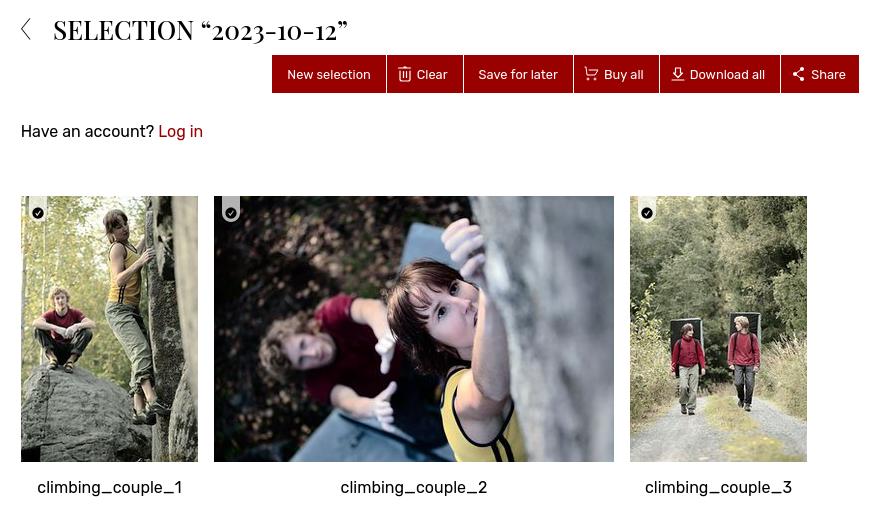
Streamline your client’s workflow
Whether you call them Selections, Lightboxes, or Favorites (you decide), this tool lets your clients curate their own lists from your galleries or library. It is especially useful for professional clients who to browse hundreds of files and narrow them down to a shortlist. Because these collections are separate from the ordering cart, clients can take their time to organize their thoughts and come back to them later without feeling the pressure of a final order.
Collaboration made easy for teams
Marketing teams and creative agencies often need to work together on a single set of assets. With this feature, a logged-in client can share their selection with colleagues via a simple link. They can even add comments to individual images or videos to provide feedback or specific instructions. For instance, a brand manager can create a selection of shots for a new campaign and share it with their designer or manager to get a second opinion, all within your website.
Faster paths to purchase and download
When the selection is finalized, the workflow remains seamless. If you allow it, your clients can buy or download the entire collection in one go. This removes the friction of adding dozens of items to a cart individually. A commercial client who has just spent an hour shortlisting 50 photos from an event can immediately move them all to the cart, saving them time and making the experience much more professional.
Stay in control of the process
You can see what your clients are selecting in real-time from your own dashboard. This gives you valuable insight into their preferences before a project is even finished. You also have the flexibility to control access rights, so you can decide who is allowed to edit a selection and who should only be able to view it. It is a powerful way to handle proofing and feedback for high-end photography and video projects.

FAQ
How can my clients pick and save their favorite photos?
By using the selections feature, your clients can go through your gallery and mark their favorites. This creates a neat list that they can share and that you can see on your end.
Can multiple people collaborate on a set of images in a gallery?
Yes, a client can save a selection and share the link with their team. If they are logged in, they can also leave comments on specific images to discuss them with their colleagues or with you.
What is the easiest way for a client to buy 20 specific images at once?
Instead of adding them one by one to the cart, the client can first add them to a selection and then use the batch purchase button to add the entire collection to their cart in a single click.