Custom metadata fields
Tag your assets in a structured and consistent way and give your users intuitive, precise control over their media search.
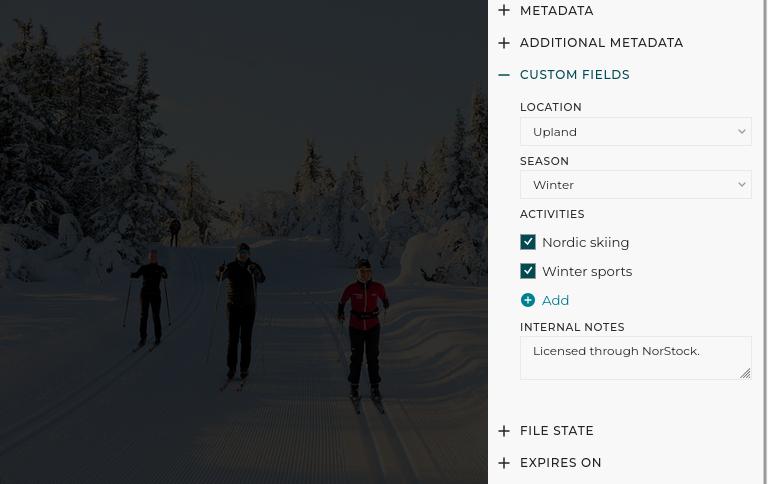
In professional Digital Asset Management (DAM), essential metadata like titles and keywords are just the starting point. PhotoDeck’s Custom Fields are the powerful, flexible tool that allows you to add specific, proprietary data to your files, transforming a simple collection into a highly structured, searchable, and efficient library. This is crucial for matching your unique needs and internal workflows.
For photo agencies, this feature turns your online archives into a highly effective licensing portal and archive. For marketing and corporate teams, it ensures brand consistency and compliance by enforcing a tagging structure and making it impossible for stakeholders to use the wrong asset.
Effortless asset discovery with tailored filters
Go beyond basic search functionality. Custom Fields allow you to convert your internal categorization logic into intuitive dropdown filters on your public and private websites. This dramatically improves the user experience by letting clients and colleagues quickly narrow down vast collections based on criteria that matter most to them.
- Use Case for Agencies: If you license images where location is a key factor, create a “Geographical Region” or “City” custom field with predefined values. Clients can select the required area from a dropdown, instantly eliminating irrelevant results and significantly accelerating the path to purchase.
- Use Case for Corporate DAM: Manage files for multiple global brands or product lines. Create a “Brand” or “Subsidiary” custom field. Team members can instantly filter the entire library to view only assets approved for their specific brand, ensuring adherence to brand guidelines.
Ensure data integrity with controlled vocabulary
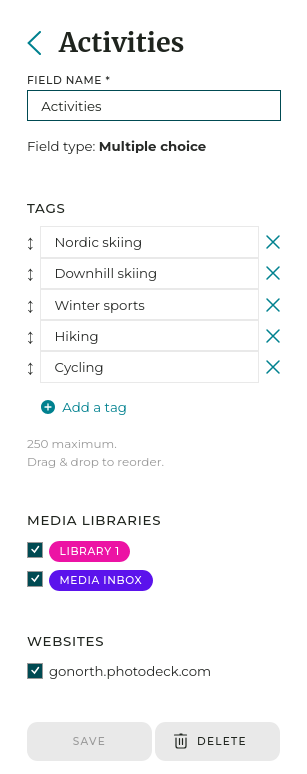
Inconsistent tagging is the enemy of efficient DAM. By utilizing Single choice or Multiple choice fields, you enforce a controlled vocabulary. You define a list of acceptable values (tags), forcing users, whether you or your team, to select from that list. This eliminates typos, prevents redundant tags (like “Horizontal” vs. “Landscape”), and guarantees high-quality, reliable metadata across every asset.
- Use Case for Compliance: For assets requiring specific legal information, create fields like “Authorized uses” or “RGPD consent”. Using a controlled list ensures every asset is correctly tagged, minimizing legal risks and making it easy for users to filter out images they shouldn’t use.
Flexible data display and internal annotation
Not every piece of information needs to be a search filter. With Free text fields, you can attach critical, unconstrained notes that are viewable alongside the media. Furthermore, you have complete control over how custom metadata is displayed on your website, allowing you to integrate technical or contextual data directly into the image layout, or keeping some data to the library back-end.
- Use case for teams: Attach internal notes like “Sourced from” or “Contact person”. This data is immediately available to your internal team without confusing the front-end website’s users.

FAQ
How can I make my online media library easier for clients to search?
PhotoDeck Custom Fields allow you to transform your internal file categories into simple, user-friendly dropdown search filters on your website. This moves beyond basic keyword searching, letting clients quickly narrow down results by criteria specific to your collection, such as “Year of production”, or “Product line”.
My team is using inconsistent tags for our marketing assets. How can I fix this?
You can enforce a standardized list of values for important data, such as “Usage Rights” or “Property Name,” using PhotoDeck’s Single or Multiple choice Custom Fields. This controlled vocabulary ensures every file is tagged consistently across your collection, eliminating typos and conflicting terms that hurt search results.
Is there a way to add special data to my images for my internal team without making it public or searchable?
Yes. The Free text Custom Field allows you to add specific, unconstrained text notes to any file—like internal project IDs, original file paths, or production notes. This data can be displayed to your internal users or team members without necessarily being visible on the front-end website.