Free downloads
Give your clients the files they need, how they need them, instantly.
As a professional, your gallery website is often a central hub for fulfilling client requests, whether that’s handing over final, high-resolution files, or simply providing watermarked previews for selection. PhotoDeck’s download features let you control what clients can freely download, from simple previews to full-resolution originals, and even custom-reprocessed files, turning file delivery from a chore into a seamless experience.
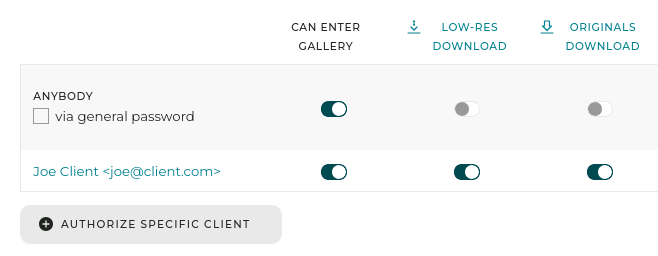
You decide precisely which clients or client groups are allowed to download files freely, and what those files are: the original files you uploaded, pre-generated low-res previews or custom formats tailored to their specific use.
Free downloads examples
- For the assignment photographer: After a shoot, grant your main client contact access to the download of original files for all finished images. They can download the final, full-resolution JPEGs (or other originals) with a single click, without having to contact you or place an order.
- For photo agencies: Enable “low-res download” for clients to quickly grab watermarked, low-resolution versions of your media for layout mock-ups and internal approval before licensing the final images.
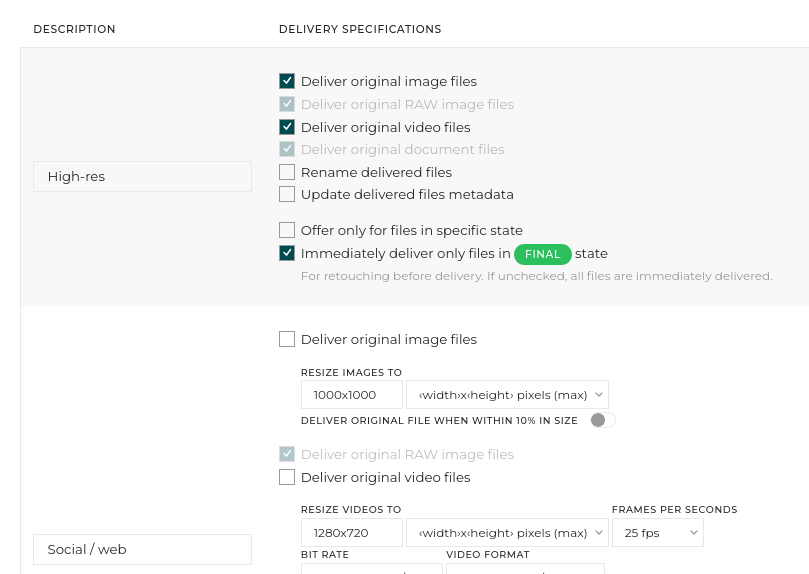
- For marketing teams: Use the “Custom download” option to automatically enforce file standards. For a specific client or group, configure downloads to always be delivered as 1000px wide JPEGs, optimized for their website, ensuring brand consistency. You can even automatically rename files and adjust metadata upon download.
- For selection and approval workflows: For a job requiring client selection (e.g., culling favorites for retouching), use “Custom download” and limit the immediate delivery to only files you have marked as “FINAL”, so you can edit the others before releasing them to the client in a streamlined workflow.
By empowering your clients to securely and instantly access the correct files, you save valuable time, eliminate back-and-forth emails, and provide a superior, professional client experience.
FAQ
How can I let clients download a low-resolution version of my images for internal review before purchasing?
You can enable “Low-res download” access in the gallery’s authorization settings. This displays a download button that provides a low-resolution, watermarked version of the image (if you used a watermark during upload). This is perfect for clients who need to test layout and get approvals before buying the high-resolution file.
I need to give my client the final, full-size files without them having to buy them. How can I do this easily?
Grant the client “Original download” access for that gallery. They will be able to download the exact, high-resolution original files you uploaded, instantly and for free, directly from the gallery page, individually or in bulk.
Can I make sure the files my clients download are always resized to specific dimensions for their internal systems?
Yes, by setting up a “Custom download” authorization. You can define specific parameters—such as exact size, metadata, and renaming rules—that automatically reprocess the original files on-demand. When the authorized client downloads, they receive the files exactly as specified.